Hardware · Bar widget
dGPU statusOn the marketplace
Whether the discrete GPU is asleep or awake, and what woke it.
A laptop with an NVIDIA card spends its battery on whatever quietly keeps that card awake. This tells you which it is.
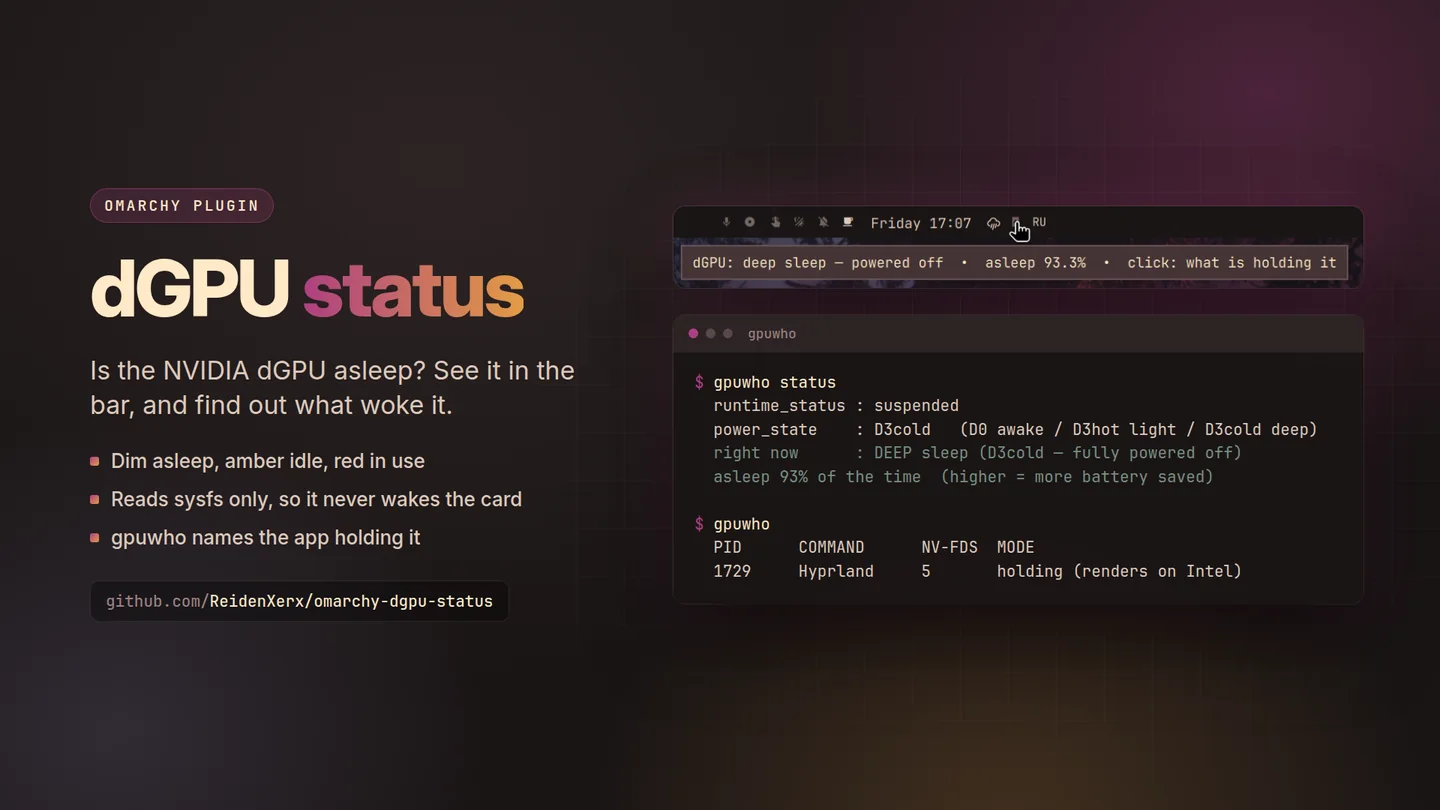
What only dGPU status does
Why this one
- Asleep or awake, at a glance.On the bar, where you will actually notice it.
- gpuwho names the culprit.A read-only CLI for seeing what is holding the card open — often something you did not know was asking.
- It does not wake the card to check.A status widget that polls the GPU is the reason the GPU is awake; this one avoids that.
For laptops with an NVIDIA discrete GPU.
Using it
How you reach it
| Do this | And |
|---|---|
| gpuwho | See what is keeping the discrete GPU awake |
Also on KDE Plasma In testing
dGPU status for Plasma 6
An icon in the panel or the tray that is muted while the card sleeps, and gpuwho's list in its popup. Hidden on computers without an NVIDIA card.
Then right click the panel, choose Add or Manage Widgets, and drag dGPU status onto it.
Until it is on the KDE Store it installs from its plasma branch.
Getting it
One command
Then restart the shell with omarchy-restart-shell. Licensed MIT;
remove it any time with omarchy plugin remove.
← All plugins
Free and open source. Support its development.