Battery · Bar and panel
ReserveNew
The battery screen your phone has, for your laptop.
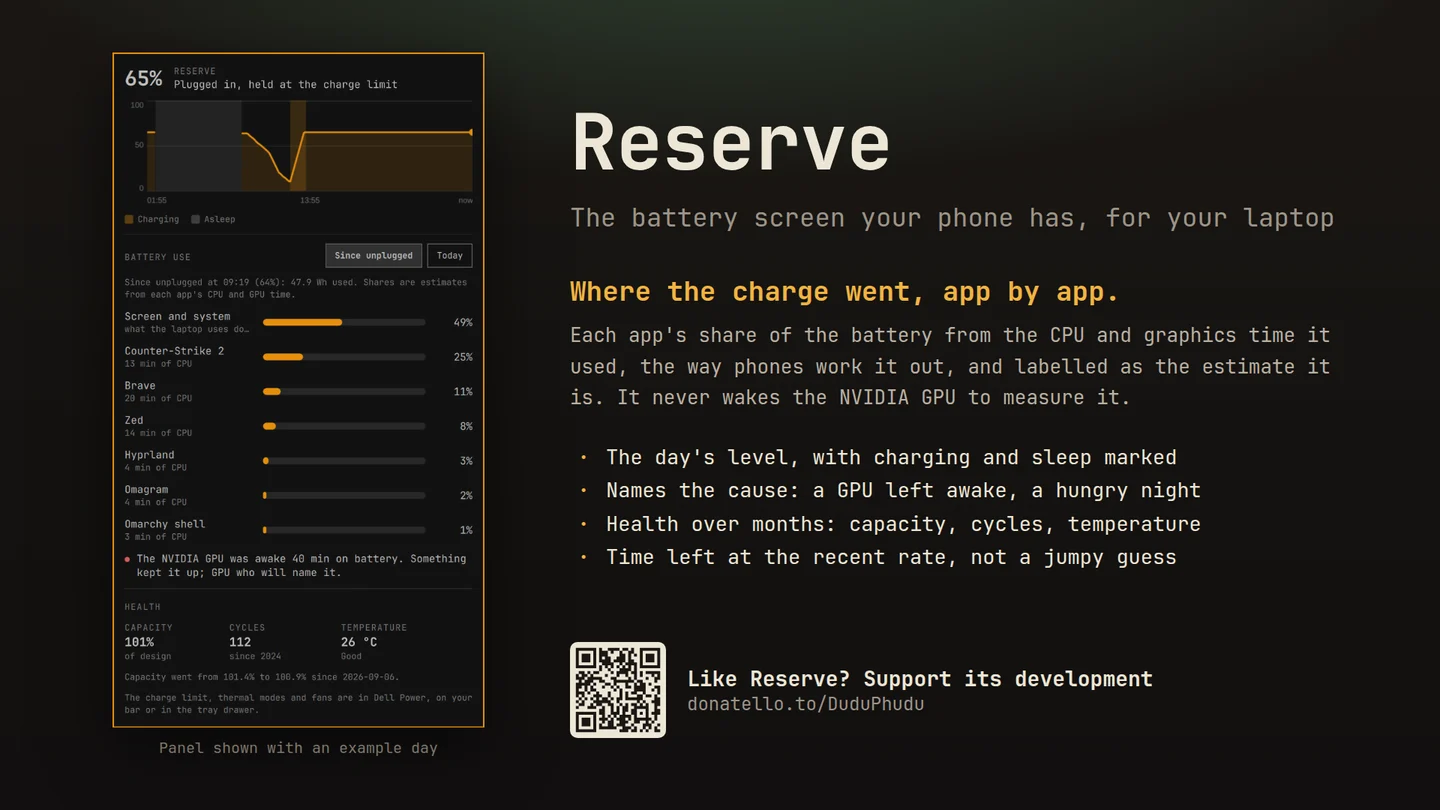
How the day went, which apps used the charge, how healthy the battery is, and a plain-words reason when it drained faster than it should.
What only Reserve does
Why this one
- Usage by app, on a laptop.Each app's share of the battery, worked out from the CPU and graphics time it used, the way phones do it, and labelled as an estimate because that is what it is. The screen and the idle system get their own line.
- It names the cause.A graphics card left awake on battery, a night asleep that drained more than it should, one app that took most of the charge, each said in plain words.
- Measuring never costs you battery.It never wakes the dedicated GPU to ask how it is, and its once-a-minute sampler takes about 40 ms of CPU a minute.
- It sees a charger that is not enough.On battery means the battery is discharging, so a game that outruns a small USB-C charger is counted as the drain it is, not hidden behind “plugged in”.
- Health over months, not just today.Capacity against the battery's design, cycles and temperature, with a daily log, so slow wear is visible long before it bites.
- Charging, explained.The charger's real wattage over USB-C, and whether a charge limit is holding the battery where it is. A charger too small for a gaming GPU says so.
No root, no account, no network. History stays on your laptop: 30 days of samples and app activity, about 5 MB, and a daily capacity reading for the health trend, in a folder only you can read.
Using it
How you reach it
| Do this | And |
|---|---|
| Click the battery in the bar | Today's chart, usage by app, health and charging |
| Since unplugged or Today | Battery use for the run on battery, or for the whole day |
| A dot in the panel | Something worth knowing, in plain words |
Also on KDE Plasma In testing
Reserve for Plasma 6
Fits the panel or the system tray beside Plasma's own battery widget; the level comes from Plasma's power management, the history from the same sampler.
Then right click the panel, choose Add or Manage Widgets, and drag Reserve onto it.
Until it is on the KDE Store it installs from its plasma branch.
Getting it
One command
Then add the widget to your bar and restart the shell with omarchy-restart-shell. Licensed MIT;
remove it any time with omarchy plugin remove reidenxerx.reserve.